New Combo
Mevo Gen2 with Pro Package and Face Impact Location
Mevo+ to Mevo Gen2 Trade-In
Mevo Gen2
Mevo Gen2 tracer
Mevo Gen2 video overlay
Mevo Gen2 E6 Connect Software
TheStack System
TheStack System
TheStack
TheStack System Bundle and app

Mevo Gen2 with TheStack

Unlock Explosive Speed: Mevo Gen2 + TheStack System.

The Mevo Gen2 with TheStack System is the ultimate power-boosting bundle, built for the golfer wanting to gain club head speed and maximize distance. The Mevo Gen2 is your precision data tracker, providing validated swing speed and TheStack is your proven system for adding explosive miles per hour to your driver. Together, they form a powerful training loop: Train with TheStack, Measure with the Mevo Gen2, and Repeat until your goals are met. 

Key Bundle Highlights:

  • Measurable Speed Gains: Use TheStack for weighted speed training while the Mevo Gen2 provides immediate, verified speed data to confirm your gains and chart your progress.

  • Integrated Training: The Mevo Gen2 features a dedicated Swing Training mode that complements TheStack, allowing you to track club head speed without hitting a ball.

  • Data Validation: The Mevo Gen2's accurate ball speed and carry distance data validates that your speed training is translating into on-course distance.

  • Analysis & Entertainment: After speed training, cool down with detailed ball flight analysis or play one of the 8 included E6 Connect courses to see your new speed in action.

Regular price$1,598
/
‎
TheStack (Size)
  • Free shipping within the Continental U.S.
  • 30-Day Return Guarantee
  • Secure Checkout
  • Online support

Mevo+ Launch Monitor

In The Box:

  • Mevo Gen2 unit
  • Power supply
  • USB-C cable
  • Carry case
  • Quickstart guide
  • 100 aluminum stickers

Free Software:

  • FS Golf Practice App for iOS, Android, and PC
  • FS Skills Challenges App for iOS and Android
  • E6 Connect 8 Course Bundle for iOS and PC:
  1. Kiawah Ocean Course: SC, USA
  2. Torrey Pines South Course: CA, USA
  3. Kapalua Golf Club Plantation Course: HI, USA
  4. Valderrama Golf Club: Cádiz, Spain
  5. Sea Island Seaside Course: GA, USA
  6. Pelican Hill Golf Club: CA, USA
  7. Chateau Whistler Golf Club: BC, Canada
  8. Latrobe Country Club: PA, USA

TheStack System

  • 5 milled Stack weights enable 30 weight combinations between 0g and 300g
  • Dual-purpose weight case / phone stand
  • Highly engineered training club - Adult (41.5") or Junior (38.5") version (see Fitting Juniors)
  • Stack training requires a speed device that can measure swings without ball impact.

Mevo Gen2

Dimensions: ‎6.9 x 1.2 x 5.6 inches

Weight: 1.1 lbs

Batteries: ‎ Rechargeable Li-ion battery included. Battery life up to 6 hours

FS Golf App Requirements:

iOS
Minimum:
System: iOS 18 or newer
iPad: 9th gen+ / mini 6th gen+ / air 5th gen+ / pro 4th gen+
iPhone: XR / XS / 11+

Recommended:
System: iOS 18
iPad: iPad Pro 6th or 7th gen
iPhone: 15 Pro / 16 Pro +

Android
Minimum:
System: Android 14 or newer
Processor: Snapdragon 865 / Exynos 990 or equivalent
RAM: 8 GB

Recommended:
System: Android 14 or newer
Processor: Snapdragon 8 Gen 1 / Exynos 2200 or equivalent
RAM: 12 GB or more

Windows
Minimum:
OS: Win 10 or 11 (64 bit)
CPU: Intel Core i3-13100/ Ryzen 5 5560 (or higher)
RAM: 8GB DDR4 (or higher)
Hard-drive: 128GB (at least 10GB of free memory)

Recommended:
OS: Win 10 or 11 (64 bit)
CPU: Intel Core i5-10210/ Ryzen 5 5600 (or higher)
RAM: 16GB DDR4 (or higher)
GPU: Intel UHD Graphics/ Radeon Graphics or better Compatible with DirectX 11
Hard-drive: 256GB (at least 10GB of free memory, SSD drive recommended)

E6 Connect PC
Intel i5 Processor
8GB RAM
Nvidia 1070 Graphics Card or equivalent
(Dedicated GPU with DirectX 11 Support)
25GB of Hard Drive Space
Windows 10 (Required)
Internet Connection (Required)

Limited Flight: 8 feet from unit to tee with 8 feet ball flight. Aluminum stickers or Titleist RCT balls required for accurate spin measurements.

Outdoor Full Swing: 8 feet from unit to tee with unrestricted ball flight.

Mevo Gen2 is designed to operate in most environments. However certain appliances and equipment can create noise that can interfere with resulting shots. Some common noisy objects are:

  • fluorescent lights
  • fans
  • fridges
  • tv’s, laptops & desktop computers in front of the Mevo
  • signal towers
  • aircon unit - HVAC System
  • Includes 1-Year Membership to TheStack App. Now on iOS, Android (Beta), and Chrome Web (Beta)
  • Adaptive speed training formulated by Dr. Sasho MacKenzie
  • Guided workout timer for reps, sets, and rest intervals
  • Custom speed metrics to track your gains
  • Bluetooth Connectivity to integration devices. Hands-free data entry using voice entry technology for non-integrated devices
  • Membership includes Bundled access to Stack Putting (iOS), Stack Wedging (iOS), and the Learning Library (All Platforms)
  • Train and track up to twenty local (i.e. family) users under one login. App works with Family Sharing so the entire family can train easily on separate devices
  • Connect to any other Stacker using Share Codes

Access TheStack App from the App Store when your order arrives. Requires iOS 15.0 or newer. Now available on Google Play Store for Android or access it on Chrome Web.

Delivery Times

Mevo Gen2: Ships Free 2-Day Air (Cont. U.S.)

Shipping Rates and Estimates

Charges to deliver to your shipping address will be calculated and displayed at checkout when you order.

Please visit our shipping policy page for more information.

TheStack: orders will be fulfilled within 3-5 business days. Transit to your location is in addition to fulfillment time. Ships directly from TheStack.

Please visit their shipping policy here.

Mevo Gen2: We accept returns up to 30 days after delivery. Please consult our sales terms and conditions including our refund policy. Please note that card processing fees for your order are non-refundable.

TheStack: If you are not satisfied and would like to request a return, please email them at info@thestacksystem.com within 30 days of delivery for instructions on how to return your item. To receive a full refund of the purchase price (minus shipping), all components of TheStack hardware must be returned to them. Please read their return policy here.

TheStack Warranty: TheStack hardware includes a 2-year warranty from date of purchase for manufacturing defects.

Download the Mevo Gen2 user manual

FlightScope works hard to put out continuous updates to provide the best experience with our hardware and software. It is important to check for these updates in your application to get the most out of your FlightScope Mevo Gen2.

Go to the Firmware & Apps page.

If you need additional assistance, our Customer Care team is available.

Customer Reviews

Overall rating: 4.6 / 5 from 462 reviews.

This is a great machine and one of my first pics for practice sessions while traveling for an avid golfer. Would also be a topic for indoor simulator if you have a large space beyond its required specification.

Mevo Gen2

Took a couple tries to set up, but once it got gone, it works great. I love the number and clear display of key swing metrics offered.

Mevo Gen2

My husband loves it. Worth every penny.

Mevo Gen2

So much better than our old launch monitor. Very accurate. Makes range time much more fun and productive. Really helps dial in carry distances. Eventually plan on adding face to path add on but it’s a little pricey. Highly recommend.

Mevo Gen2

Customer photo review of Mevo Gen2

I love it, just need to get the putting tracking fixed

Mevo Gen2

First golf launch monitor I’ve purchased and I love it. Have only used it outside at the range but will be using it indoors as well once I get a simulator set up. Love seeing my swing and how to improve on it

Mevo Gen2

Awesome !

Mevo Gen2

Love all the data. So helpful for improving

Mevo Gen2

The Mevo 2Gen is working great, highly recommend it!

Mevo Gen2

I use this on the range every day. Only drawback is that I need to order a leveling stand.

Mevo Gen2

Customer photo review of Mevo Gen2

Flightscope Mevo 2 is so easy to use and has already helped my game. I’ve used it to set up an outdoor simulator that my whole family loves!

Mevo Gen2

I love the simulator. I have been frustrated with lack of instructions for setup and usage. I've use YouTube to try to find the information that I need to utilize the Mevo Gen2 to its fullest. I'm still working to resolve little issues. Mike Gaudet Canada 1-506-386-2381 Home 1-506-688-6039 Cell

Mevo Gen2

Best golf purchase I have ever made.

Mevo Gen2

The best launch monitor in the market

Mevo Gen2

The entire package is well thought out from the size of the unit, battery life, and the amount of data that is gathered for analysis. The wealth of data will not let a bad golf swing hide. It shows your shortcomings and if you don't know how to address these, you will at least have the data for a swing coach to help you.

Mevo Gen2

Well made and easy to use device. It functions as designed.

Mevo Gen2

Works well! Love it

Mevo Gen2

Very easy to use and setup. Data is accurate.

Mevo Gen2

A

Mevo Gen2

Great

Mevo Gen2

excellent, accurate, takes a bit to figure it out, directions are not the best. easy to navigate once you stumble through it a few times. I would recommend this. I had a BlueTees Rainmaker and it was horribly inaccurate. I returned it.

Mevo Gen2

Easy to set up and navigate.

Mevo Gen2

This is a great device once you nail down the best way to connect it for your setup! Looking forward to using it more to improve my game in the off-season.

Mevo Gen2

Customer photo review of Mevo Gen2

Mevo Gen 2 works like a charm after a great conversation and set up assistance by one of the tech representatives. Enjoying the add-on’s with Face Impact and Pro Package as well. Tons of valuable information that needs a pro to evaluate. Best launch monitor especially with E6 Connect installed for the money. Can’t be beat! I would recommend to a friend. 2 thumbs up!

Mevo Gen2

If you’re looking for a device to add meaningful data and structure to your practice sessions, this is phenomenal. It’s easy to customize, extremely consistent, and packed with useful features and measurements that genuinely elevate your training. Just keep in mind that if you plan to use it as a simulator, you’ll need a longer room ideally 25 feet or more. The manufacturer lists 8 feet behind and 8 feet in front, but in practice, 16 feet feels tight. For smaller spaces, an optical launch monitor may be a better fit. As a practice tool, though, this is one of the best options available. And if you do have the space for a simulator setup, the lack of a subscription and the wide range of included features make it one of the best values you’ll find for a launch monitor or sim configuration.

Mevo Gen2

I like having immediate feedback from my swing during practice. The data captured by my Mevo Gen 2 has helped in my practice and game improvement on the course. Prior to using Mevo I felt like I was just beating balls. The ability to review my practice data as well as ball flight provides where I need to target my practice. I have had other devices in the past but the data was unreliable and/or more difficult to set up.

Mevo Gen2

Great product. Easy to use. Easy to set up.

Mevo Gen2

Easy radar to use!!

Mevo Gen2

Great Product.. Right Price😎

Mevo Gen2

All the accuracy of trackman for such a good cost. Loving the data

Mevo Gen2

Love the unit

Mevo Gen2

Connecting via QR code did not work as intended but pretty easy when you treat the connection like a WiFi network and connect using the password.

Mevo Gen2

Easy to set up. Watched a few videos to help understand the metrics. Pro package and face impact were the things I was most interested in seeing. Great product.

Mevo Gen2

Customer photo review of Mevo Gen2

I've waited a long time to make this purchase. Did tons of homework. By far best system for the $ Beyond impressed w/ everything.

Mevo Gen2

Love it!

Mevo Gen2

Customer photo review of Mevo Gen2

I've really enjoyed using my FlightScope both at the driving range and with the simulator at home. The data and feedback have helped me see noticeable improvements in my game, and it's been a great tool for understanding my swing and ball flight. I'm especially looking forward to using it all winter to continue working on my shot shape and taking my game to the next level.

Mevo Gen2

Customer photo review of Mevo Gen2

Great training device. I love the size of the flight scope Mevo Gen2, makes it very comfortable for traveling. Very solid and helpful data extraction for logging training sessions. Looking forward to upgrade the Pro Package & Face Impact location package as a next step.

Mevo Gen2

GOOD

Mevo Gen2

I love the FS Mevo Gen2, how easy it was to setup everything, I’m in the process of setting the data margins for each club, Driver to 60 degree wedge. This will be very informative as it pertains to my club gaps, carry, total distance etc. I also look forward to using it for practice outside at the golf range.

Mevo Gen2

My experience with Flightscope has been amazing. I needed help setting up and I simply called them and they actually picked up the phone and spent almost an hour with me making sure I was up and running, including some quick tips too on how to have the best and most reliable experience. I had another launch monitor and returned it to to poor data and even worse customer service. I recommend Flightscope 100%

Mevo Gen2

Mevo Gen2 Data Parameters

Play Iconic Golf Courses Anywhere

Tee off on some of the world's most iconic golf courses without leaving your home.

With your Mevo Gen2, you gain lifetime ownership of an exclusive E6 Connect simulation bundle, unlocking 8 famous golf courses for endless entertainment. Challenge family and friends, work on your game, and experience the thrill of real golf courses, all from your home. Included courses for iOS and PC, straight out of the box:

Kiawah Ocean Course: SC, USA
Torrey Pines South Course: CA, USA
Kapalua Golf Club Plantation Course: HI, USA
Valderrama Golf Club: Cádiz, Spain
Sea Island Seaside Course: GA, USA
Pelican Hill Golf Club: CA, USA
Chateau Whistler Golf Club: BC, Canada
Latrobe Country Club: PA, USA

Customizable Software To Fit Your Unique Needs

Experience an advanced golf practice with the redesigned FS Golf Software, crafted to enhance your game.

Our comprehensive iOS, Android, and PC app puts powerful data, video analysis, performance data averages, and stunning 3D trajectories right at your fingertips. Take control of your progress by setting custom data margins for instant, actionable feedback on every shot. Plus, with automatic video recording and performance data overlay, you'll gain unparalleled insight into your mechanics, making every session smarter and more effective.

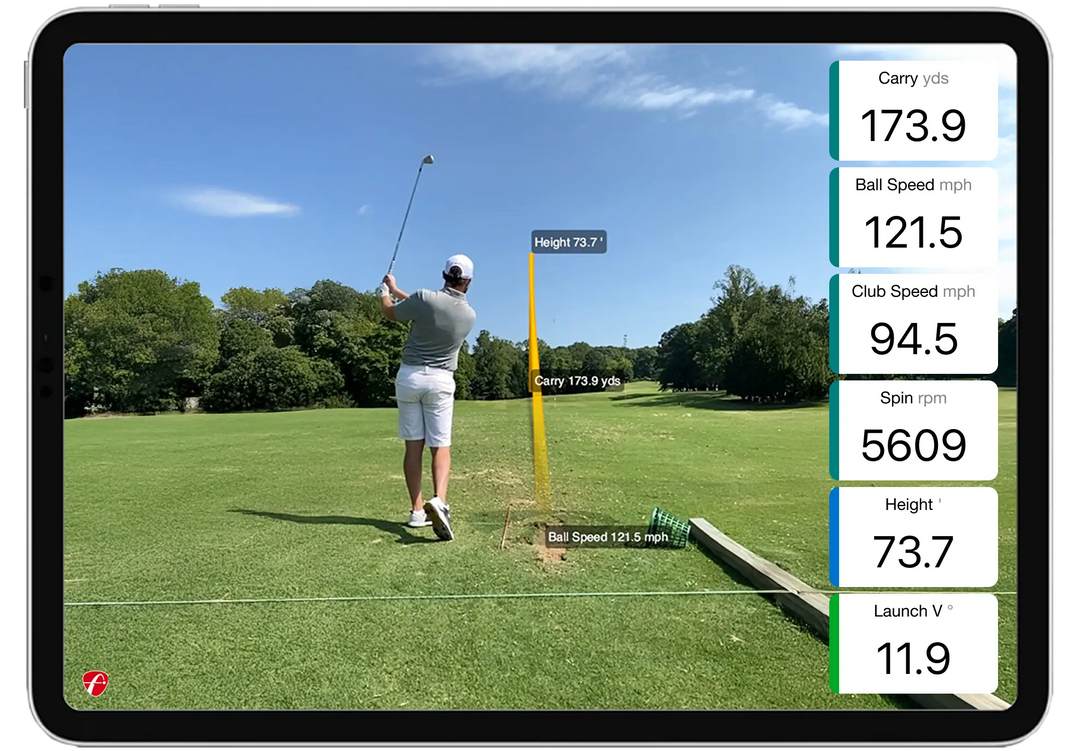
FlightScope Shot Tracer

The “As Seen on TV” FlightScope Tracer feature now has single-device compatibility allowing users to capture and view accurate 3D trajectories with performance data overlays and a shot tracer with the swing video. This gives teaching, club fitting, and practice sessions—plus social media content creators and influencers—a professional, live TV broadcast look, with the added benefit of easily and dynamically sharing these videos.

Action Video Clips with Data Overlay

The FS Golf software automatically records, clips, and saves every video and overlays performance data giving users the complete picture for every shot. Users also have the ability to draw lines and circles as well as record a voiceover with comments.

Practice with Purpose

Unlock your best golf with Mevo Gen2's Skills Combines and Challenges.

This powerful feature goes beyond standard range sessions, offering the most advanced and customizable assessments to pinpoint your strengths and identify areas for improvement. Practice with a purpose by creating Customized Challenges tailored to your unique needs, or test your abilities against the best with FS PGA and LPGA Challenges and thrilling competitions like the Long Drive and Range Competition. With Mevo Gen2, every practice session is an opportunity to refine your skills, compare your progress, and practice smarter to achieve your ultimate golfing goals.

TheStack

TheStack System is a variable inertia speed training system that increases a golfer's club head speed. 5 CNC milled Stack weights combine with a custom engineered shaft & hardware to create 30 unique combinations for unlocking dynamic variable inertia speed training.

As Seen On

Golf Channel Logo
Golfdigest Logo
Golf WRX Logo
Golf_Channel logo

TheStack App

Training made easy with the award winning App. Guided programs, timers, effortless data-entry, and track key metrics on your speed journey.

Programs

Following the Baseline Session, TheStack App provides a list of customized programming options. The list is prioritized specifically for you by greatest likelihood of increasing clubhead speed over a 6 to 10 week period (18 to 24 training sessions).

Training

During each training Session, TheStack App coaches you through each swing - seamlessly guiding stack weight configuration, swing intent and rest for each rep and set.

Hands-Free Data Collection

Using TheStack System’s voice entry technology, enjoy hands-free data collection during training sessions, by simply dictating your speed readings into the App. The hands-free data capture feature even works when wearing AirPods or earbuds. If you are training with a coach or friend, numbers can be keyed.

Workout Summaries

Detailed post-workout data review enables you to verify and, if needed, make any changes to speed data before syncing to the cloud.

Tracking and Sharing Metrics

TheStack App tracks key performance metrics such as Stack Speed, Distance Potential, Clubhead Speed and Grit Score. Easily share your progress and gains to your favorite social media platform.

Progress Checks

After completing a training program, TheStack App re-assesses your gains with a Progress Check, from there reformulating your next program. Data captured along the way improves the intelligence of TheStack algorithms through A.I. techniques.

You may also like